Real Creators, AI Videos, Made with Steve AI

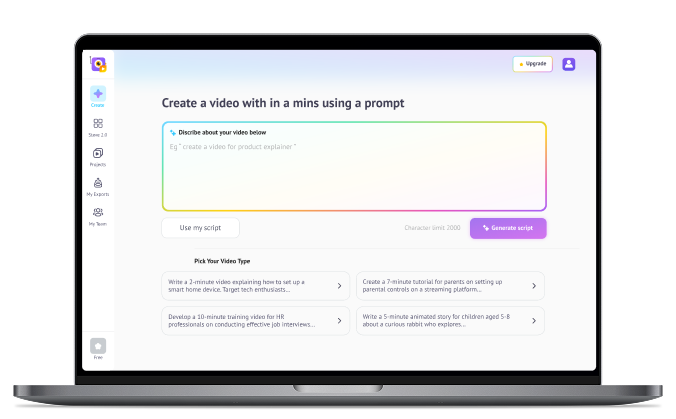
Whether you’re running ads, growing a YouTube channel, creating training content, or promoting a product, Steve AI's advanced AI Video generator adapts to what you’re trying to make. You communicate effortlessly with your audience and turn ideas into structured, professional videos in minutes.

Why Choose Steve AI's AI Video Generator?

Create Videos From Text or Images

Turn prompts, scripts, social posts, or images into engaging AI-generated videos in minutes.

Full Control Over Visuals

Customize scenes with your own visual descriptions without regenerating the entire video.

Multiple Video Styles

Choose from AI-generated visuals, stock media, and animated explainer styles for any use case.

AI Tools for Quick Edits

Generate images, convert images to videos, add motion effects, and make instant edits directly in the workspace.

Healthcare Team

Unstructured to Structured Content Transformation at a Semantic Level

Unlike simple keyword-to-visual matching, Steve AI interprets meaning, tone, and narrative intent from raw, unstructured inputs like blogs, scripts, prompts, or voices and reconstructs them into a sequenced, scene-level storyboard. This requires building a semantic-to-scene pipeline that understands context and pacing the way a human editor would, without requiring users to manually define a single scene.

Character Consistency Algorithms

Generative AI models are inherently prone to visual drift where a character's appearance or style subtly shifts between scenes, breaking narrative continuity. Solving this requires a multi-stage generative pipeline where each visual output serves as a controlled reference point for the next, progressively refining and anchoring character attributes before they are rendered into motion, ensuring style, likeness, and visual coherence are locked in at every layer, not just the final output.

Cost-effective Infrastructuring Scaling

Delivering publish-ready video with synchronized voiceovers, transitions, and motion effects within minutes, across millions of concurrent users requires solving a complex three-way trade-off between render fidelity, processing speed, and cloud compute cost. The team architected a rendering pipeline that can handle batch exports and multi-format outputs simultaneously, without compromising on quality or driving infrastructure costs to an unsustainable level.

AI Video Generator Use Cases for Modern Creators

YouTubers Trying to Monetize and Scale

From getting your first 1000 views to growing your Ad revenue, Steve AI helps YouTubers stay consistent and produce studio-quality content at scale in multiple formats.

YouTubers Trying to Monetize and Scale

Storytellers With The Quirkiest Stories

AI tools and character inconsistencies go hand-in-hand, they say? With Steve AI's advanced AI engine, transform any idea into amazing stories with consistent characters and backgrounds that connect with your audience.

Marketers Optimizing for ROI

From creating branded videos to multiple Ad variations, Steve AI helps marketers adapt to new-age marketing needs where creative fatigue and time-to-content slow down campaign performance.

Marketers Optimizing for ROI

Educators Struggling to Simplify Complex Concepts

See your topics come to life with engaging visuals, narrations, and music that keep students engaged. Steve AI helps create visuals for complex topics where finding relevant visuals is difficult.

Corporate Trainers, HRs, and Sales Folks Winning With Videos

Create videos on the go with Steve AI's simple user interface and AI tools. From creating post-call follow-ups to compliance and security training, Steve AI makes video creation easy without any learning curve.

Corporate Trainers and Sales Teams

Why Steve AI Wins Compared to Other AI Video Tools?

From patented technology to ethical AI practices, discover why Steve AI is the smarter choice for AI video creation. Competition name (InVideo, Veo, Kling)

Steve AIOther AI Video Tools
Patented AI storytelling engine for creating original contentOpen APIs with generic content
Easy access to the latest generative APIs and models in one placeLimited to specific models
Flexible Add-ons are part of all subscription plansNo flexibility with fixed subscription cost
Multiple video styles for diverse use casesMostly one flow with limited use cases
Guaranteed bang for your buck with competitive pricingHighly priced with lower value
Ethical AI and Security CompliantLimited compliance
From the makers of Animaker Inc. (Top 50 design product globally)New and third-party dependencies

How to Create AI Videos with Steve AI

Step 1 - Start with a Prompt or Paste your Script

Provide a detailed prompt with a visual description and narration, or use your own script.

Step 2 - Generate Script and Review

Review the AI-generated script and visual description, and make changes before generation at the scene level.

Step 3 - Generate Video and Preview

Generate your video and go to the workspace if you need to make further changes.

Step 4 - Download and Share

Download the preferred video format or share it across social media instantly.

Trusted by 7+ Million Creators for Fast AI Video Creation!

top-user-logo
brand-assets.softwareadvice
brand-assets.capterra
brand-img-5
brand-img-4
brand-img-3
brand-img-1
brand-img-2

Trusted by leading brands across the world

brand-logo

Frequently Asked Questions about AI Video Generator

Is Steve AI Better than Kling AI?
Kling AI directly or via its standalone API generates individual video clips. You receive raw footage: no background music, no voiceover, no transitions, no subtitles, and no scene-level editing. Steve AI uses the Kling API and wraps it with a complete production workflow. You get BGM, narration, transitions, captions, consistent AI characters, and scene editing in one place, producing a finished, publish-ready video, not a clip.
Yes. Steve AI includes collaboration tools, brand control, and multilingual support, making it ideal for teams.
HeyGen and Synthesia are similar both focus on talking avatars. Steve AI is different because it offers full animation, not just avatars. If you need varied options like animated explainers, live action, Gen AI, talking head 2D animation, and more, Steve AI wins.
How does an AI video generator work?
An AI video generator turns your text or idea into a video by choosing visuals, adding audio, and putting everything together for you. Tools like Steve AI do this in a few clicks, so you don’t need editing skills.
Free tools like Canva, CapCut, and the free plan of Steve AI are popular among creators because its easy to use and come with templates, stock footage, and simple editing options even in their free plan. Upon joining, you get 200 AI Credits and 1200 seconds of free AI video creation.
Yes, you can make vertical videos for Shorts, Reels, and TikTok directly in Steve AI.
Steve AI offers realistic AI avatars that deliver your script in different voices and languages.
Not at all. Steve AI has a free plan, and paid options are much cheaper than traditional video production.
You can make AI-generated videos in Steve AI by entering a prompt or script, and the platform automatically creates scenes, visuals, and voiceovers for you. Then you simply customize the style, timing, and assets before exporting your finished video.
Yes. Steve AI is one of the few platforms offering both animation and live video generation along with Generative AI video generation.
Steve AI is diverse and offers starting from a prompt, upload text or images, choose your style (animation, Gen AI, or live), generate your video, and refine scenes, voice, and pacing.
With Steve AI most videos are generated in under a minute, with full 4K exports available shortly after. Unless if you want to create a 20 minute or long video, it would take a couple of minutes to render.
Most tools let you start for free. Steve AI also has a free plan where you can try the features, and the paid plans give you longer videos, no watermarks, and access to more stock footage. A free user gets 200 AI Video Credits, 1200 seconds of AI video creation, and access to 10M+ stock video library.
Using an AI video generator like Steve AI saves time, removes the need for editing skills, and helps anyone create professional-looking videos quickly and easily. You pay for a tool, that mitigates the need for more tools, offers seamless integration, and seamless AI video creation.
AI video generators have several cases. Their applications spread its roots for marketing videos, social media content, educational lessons, product explainers, ads, training videos, and even fun personal projects. It saves time, removes the need for editing knowledge, and helps you create clean, professional videos quickly. Steve AI makes this even easier by letting you create videos from text, audio, or scripts.

Hear it from our happy users

It’s is an amazing AI website that helps you share your imagination with the rest of the world.

Brandi M.

Business Developer

I enjoy creating videos ,and I mean like any story video I want to create.

Mahlatse V.

Stock taker and till Operator

Everything everyone else does - in one place for one price. What else do you need to know? Buy it?

Peter A.

Digital Marketing Manager

Try these video creation tools

Tips, Trends & Tutorials
Worth Reading

end section

Best Free AI Video Generator for Creators

Whether it’s a story you want to tell, a message you need to share, or just a creative spark you’re exploring, Steve AI helps you turn it into an AI video using the AI video generator.